
Time-blocking: the complete guide to taking back your days
A to-do list tells you what you have to do. It never tells you when. That is exactly why yours is overflowing: without an appointment in the calendar, a task stays a wish. Time-blocking fixes that structural flaw by giving every important thing a slot. Cal Newport, the author of Deep Work, reckons a time-blocked 40-hour week produces as much as a 60-hour week run as things come. Here is how to get started, concretely.
What exactly is time-blocking?
Time-blocking means cutting your day into dedicated blocks: each block is reserved for one task or one type of work, like an appointment you make with yourself. Instead of a list of 20 tasks making you feel guilty, you have a plan: 9:00 to 10:30, the client file; 10:30 to 11:00, email; 11:00 to 12:00, preparing the meeting.
The mental shift is simple but deep: you no longer decide during the day, when your willpower is at its lowest, you decide beforehand, while you still have some perspective.
Why it works: 4 mechanisms
- Parkinson's law kept in check. Work expands to fill the time available. A 90-minute block imposes a constraint that concentrates the effort.
- The cost of context switching disappears. Each interruption costs an average of 23 minutes to refocus (Gloria Mark, UC Irvine). Blocks protect stretches of deep work.
- Forced realism. Placing your tasks in a calendar immediately reveals that a day contains only 6 to 7 useful hours. You stop planning 14 hours of work into 8.
- The decision is already made. At 9:00 the question is no longer "what do I start with?", the calendar has answered. Procrastination loses its favourite playground, which is choice.
The method, step by step
1. List, then estimate
Start from your task list and give each one a realistic duration. Rule of thumb: your first estimate multiplied by 1.5. Underestimating is beginners' mistake number one.
2. Block deep work first
Place your one or two blocks of intense concentration (90 to 120 minutes) at the hours when your energy peaks, which for most people is the morning. These are the non-negotiable blocks, and the rest is organised around them.
3. Group the small tasks
Email, messages, admin: group them into one or two 30-minute batching blocks. Checking your inbox continuously is the death of time-blocking.
4. Keep empty space
Leave 20 to 30 % of the day unblocked. The unexpected will arrive, and if it has nowhere to go it will eat your deep blocks. A buffer block late in the afternoon absorbs the overflow.
5. Reschedule without guilt
A missed block is not recovered by "trying harder", it is rescheduled, the way you move an appointment. The 5-minute review at the end of the day (what drops, what moves?) is part of the method. Time-blocking is in fact only one of the seven principles of effective time management: it is the one that makes the other six applicable.
The 3 useful variants
Task batching
Grouping tasks of the same nature into one block (all the invoices, all the calls). It reduces the context-switching cost to almost zero.
Day theming
Giving each day a theme: Monday product, Tuesday clients, Wednesday content. Ideal for founders and freelancers who wear several hats.
Time-boxing
The "contract" version: the block has a hard end, and when the time is up you stop, finished or not. Perfect for tasks with no natural end, such as research, monitoring or polishing.
Example: a realistic time-blocked day
| Slot | Block | Type |
|---|---|---|
| 8:30 to 9:00 | Review the plan, urgent email only | Batching |
| 9:00 to 10:45 | Deep work: the priority file | Deep work |
| 10:45 to 11:00 | A real break, no screen | Recovery |
| 11:00 to 12:30 | Meetings and calls | Collaborative |
| 13:30 to 14:00 | Email and messages (batch 2) | Batching |
| 14:00 to 15:30 | Deep work 2, or medium tasks | Deep work |
| 15:30 to 16:30 | Buffer: surprises and overflow | Buffer |
| 16:30 to 17:00 | Close-down: review the day, plan tomorrow | Ritual |
The 5 mistakes that make people quit
- Blocking 100 % of the day. The first surprise destroys the whole plan, and the frustration makes people abandon the method within a week. Aim for 70 to 80 %.
- Blocks that are too granular. Planning in 15-minute slices turns the method into a prison. The useful grain is 30 minutes to 2 hours.
- Ignoring your energy. A deep-work block at 3:30 pm after a heavy lunch is fiction. Line the demanding blocks up with your real peaks.
- Never revising. The morning plan is a hypothesis. Without the 5 minutes of evening rescheduling, the gap between plan and reality becomes discouraging.
- Treating the calendar and the to-do list as two worlds. If your tasks live in one tool and your slots in another, the friction of copying kills the routine in a fortnight.
Which tool for time-blocking?
Paper, Google Calendar, anything works as long as friction stays low. That is precisely the weak point of the "separate to-do list plus calendar" pairing: copying each task into the calendar, twice a day, every day. If that is exactly where your hesitation lies, our Cosmo and Todoist comparison makes it its main angle.
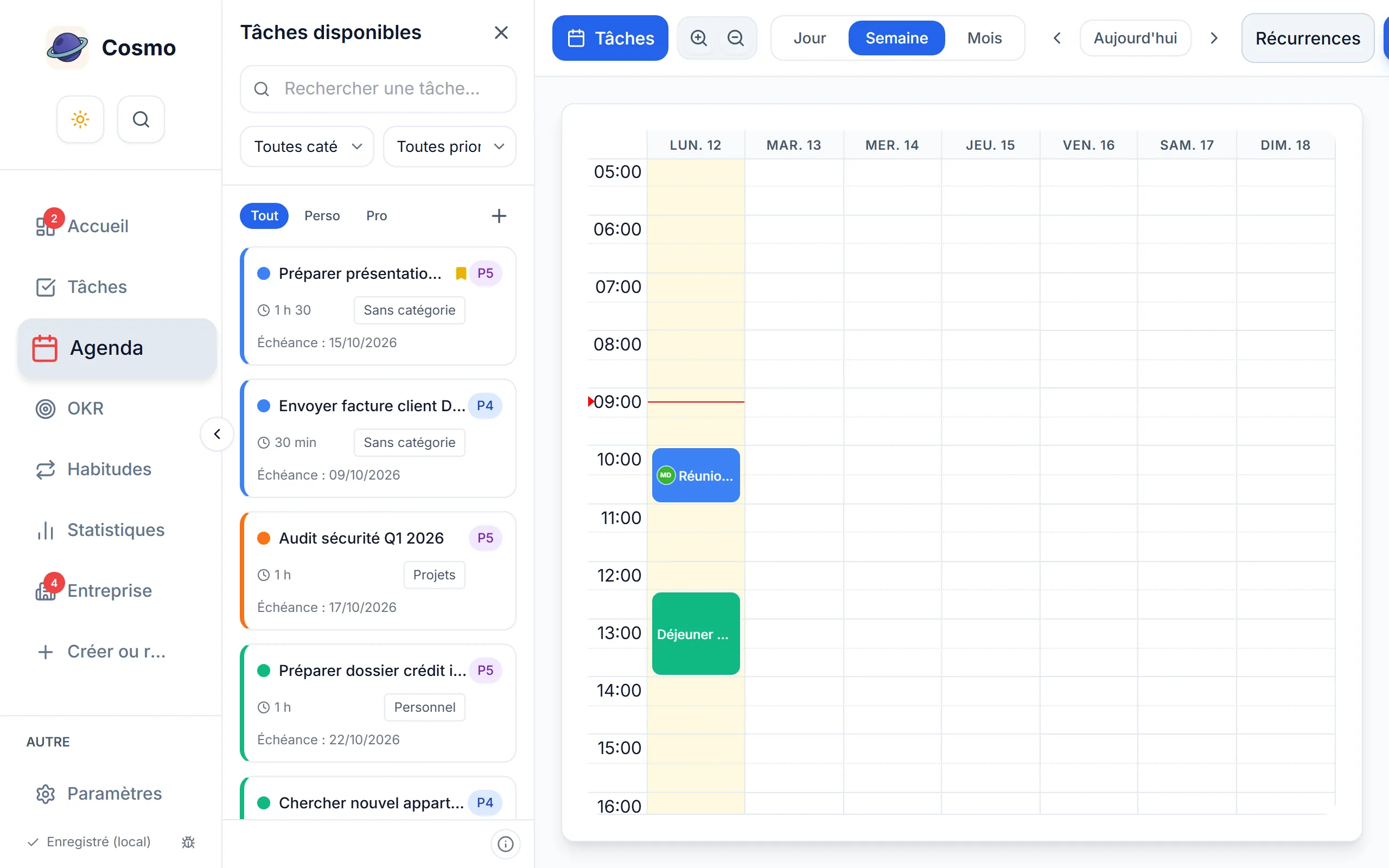
In Cosmo, time-blocking is native: your tasks appear in a panel beside the calendar, and dragging a task onto a slot creates the linked event, duration, category and colour included. A completed task updates your time-invested statistics, and if it feeds an OKR, the progress follows. Planning your day takes two minutes, for free, and the demo can be tried without signing up.
Frequently asked questions
How long does it take to get the hang of it?
Allow two weeks of running in: the first mostly serves to show you that you underestimate how long things take. That is normal, and it is already a gain.
Does time-blocking work in a job full of interruptions?
Yes, by inverting the logic: block only 2 or 3 protected hours a day, the vital minimum of deep work, and leave the rest open. Even partial, the gain is real.
Should you time-block at the weekend?
Nothing requires it. Many people only benefit from one or two chosen blocks (exercise, a personal project), and the rest of their free time stays free.